Skip to product information
1 of 6

ViewSonic TD2230 22" FHD 1080p 60Hz Touch Screen Monitor with Dual Speakers

ViewSonic TD2230 22" FHD 1080p 60Hz Touch Screen Monitor with Dual Speakers

Brand: ViewSonic
Regular price Rs. 24,812.00
Regular price 31% off Rs. 35,868.00 Sale price Rs. 24,812.00
Sale Sold out
Check delivery time to your location
Quantity
  • 100% Genuine, Brand New & Sealed
  • Original Manufacturer Warranty
  • Trusted Since 2014 ยท 15 Lakh+ Orders
View full details

ViewSonic TD2230 is a 21.5-inch Full HD display with 10-point projected capacitive touch and SuperClear IPS-type technology, offering a responsive, intuitive touch experience with high-quality image.

  • 22-Inch Full HD Touch Display: Enjoy a responsive touch experience with a 22-inch Full HD (1920x1080) resolution.
  • 10-Point Projected Capacitive Touch Technology: Precise and intuitive touch capability for seamless interaction.
  • SuperClearยฎ IPS Panel Technology: Provides accurate colors and wide viewing angles for consistent image quality.
  • Frameless Design: Ultra-thin bezels maximize screen space and create a sleek, modern aesthetic.
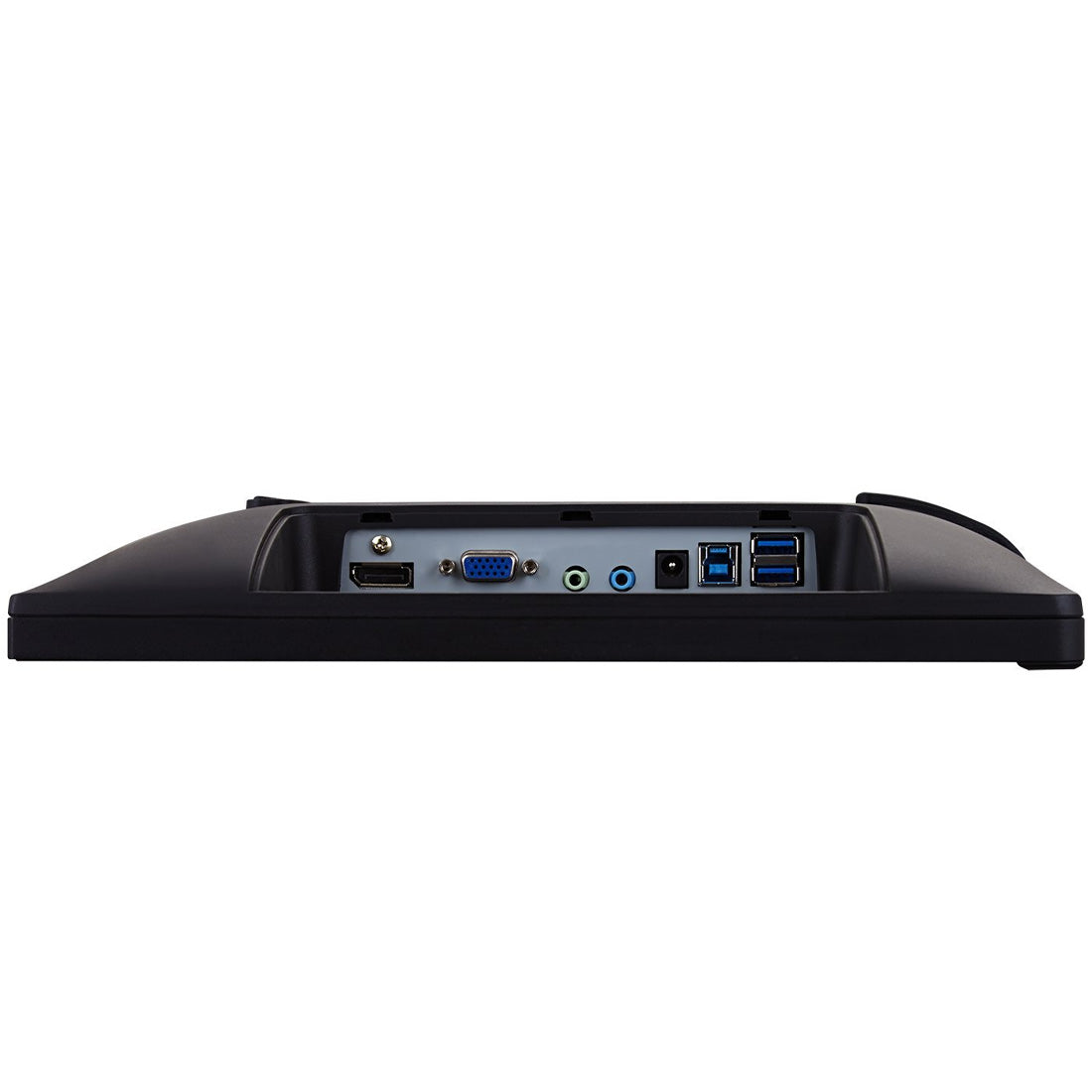
  • Versatile Connectivity: Includes HDMI, DisplayPort, VGA, and USB ports for flexible connection to various devices and peripherals.
  • Ergonomic Stand: Adjustable tilt functionality allows for comfortable touch interactions and viewing angles.
  • Blue Light Filter and Flicker-Free Technology: Reduces eye strain and fatigue by minimizing blue light emissions and screen flickering.
  • Dual Integrated Speakers: Built-in speakers deliver clear and immersive audio without the need for external speakers.
  • VESA Compatibility: Compatible with VESA mounts (100x100mm) for easy installation on a wall or monitor arm.
  • Energy-Saving Eco-Mode: Eco-mode feature helps conserve energy and extend the monitor's lifespan.

Display
  • 5 stars: 22 (59%)
  • 4 stars: 15 (41%)
  • 3 stars: 0 (0%)
  • 2 stars: 0 (0%)
  • 1 star: 0 (0%)
S
Srinivas (Hyderabad, Telangana)

VERY GOOD DISPLAY

T
Tenzin Lama

2 thumbs up

V
Vinay K.

Product is good but but buy only if you have type C3.1 devices and those devices are more costly than this, like starts from 30k and only few smartphones like Samsung, Pixel are having Type C3.1, So think before buying!!!!It's best if you already have those devices OrIf you can afford additional big bucks to get those devices!!!HDMI function doesn't support touch for Mobiles!!!So finally it's both Good and Not Good product because it's not good standalone, you have to buy it's relatives ๐Ÿ˜… to make it good.

V
Vihan

Just what I needed. As usual on-time delivery by TPS.The monitor is compact and supports windows 10. Well it also supports screen resolution upto 1920x1080 even if the product description says otherwise.

t
tushar patel

Awesome Product with good features..Value for Money. It's really worth to buy. One of the best Touch Monitor in Portable category. Just Amazing.

I
Impoda Enterprise

Good product

D
Dipanshu handoo

It is a great product

P
Placeholder

The monitor is pretty decent. I needed this as a third monitor that I wanted to use in portrait mode and it serves the purpose quite well. Priced a bit high if you ask me. I would call it a good value for money product if its prices are around 18K.

S
Sreeprasad

Picture quality and touch quality is better to use for Windows and Mac. Brightness also good enough to have in this size to use as additional display.

B
Bittesh

Using this as my secondary monitor for past 2 months while WFH... No issues. Portable.

P
Pankaj Jadhav

I bought this monitor since this is one of the few portable screens which provide hdmi input and which fit my budget. Since i had to carry it i wanted a portable monitor. Its screen size is just small enough to fit in laptop bag. But it is really not a portable monitor. It needs a power source. Also the adapter which comes with it, doeas fit regular plugs so you might have to buy a converter. Over all ,its ok if you need a small screen and you are ok to have an additional power source.

H
Himanshu R.

It is out of this world my dream of bezel less portable touch screen monitor completed with this product for MacBook Air 2017 , touch screen working with Hackintosh PC too containing Quad boot Setup Of Windows 10 WinToGo, Ubuntu external , Pheonix OS external SSD with YouTube Vanced Swipe Up pinch to Zoom All perfectly working i am amaze using it but whenever I kept connected USB Type A to USB Type C for touch functionality it try to take power from CPU to power UP the monitor but unable to power why is that so?

g
grimax

Touch is very responsive... love the build quality. Abit glosy and figure print magnet. So need to put Matt screen later. But can't ask for more. As I travel alot and have to trade and do other business. Can't ask for more... go for it.

M
Marvel Johny

a bit expensive but still a great purchase, 6 months of daily use, and no issues so far. connects easily with both windows and android. The touch screen is usable even without the stylus.

P
Phanjoubam Herojit Meitei

Waiting for the same company to build wireless display. That would even better.

M
Mathematech

Very good looking, light and picture quality is up to the markFunctionally the speakers are uselessI was supplied a very weird stylus with it without any extra attachment for the stylus seen in various review videosOne negative aspect is that if there is not adequate power supplied to this monitor, it may keep trying to power the display on which leads to some kind of flickering. So if u have connected the monitor using HDMI and therefore connected a USB-A to USB-C cable for touch functionality then this happens probably because the USB-A port cannot provide adequate power...

H
Hypur Padre

Am using this to develop museum kiosk touch screen displays with a BrightSign brand controller. It works very well so far. The touch pressure is appropriate and the screen display looks good. The owners manual is a little sparse on detail. You should know that the touch screen output from the display goes through the serial port on the monitor that looks vaguely like an Ethernet connection - it is called a USB type B connector and is used or was used on printers in the past. A cable is included to fit and the other end is a USB type A that can connect or easily adapt to fit whatever is looking for the touch screen position information. I could not find this info in the instructions but found it through experimentation. Probably common knowledge to the computer experts - but I do not live in my parents basement haha.Too soon to comment on long term performance, but I have noticed a lot of Viewsonic touch screens for the cashiers at grocery stores - for whatever that is worth.

R
RMB

Type c to any device like Laptop or mobile phone included iPhone or Android. I used it MacBook Pro 2012. there are three connection I needed to provide, one for power, second for control, thirdly mini HDMI. You need to install vTouch software prior to this. After this I realised it worked with one touch only.This worked with Microsoft os on DELL. No problem.Try to link with android using type c connection it did not work. Even though there is video showing that it works from that I found it needed Type C 3.0.So summary - good but vaguely defined interface.

R
Ravimenon.K

Nothing....

H
Heena patel

Very good product and service amazing experience of working with viewsonic.Picture quality and resolution very good.Price is high but product options not available.

p
premnath tammina

If you are looking for the portable touch monitor this is the right onePros1) Light weight2) Touch was smooth3) Multi connectivity4) Easy to carry in traveling5) Easy to connect with Laptop / PC, Mobile, Mi Box and Play Station6) Touch worked with HDMI (Use HDMI - Mini HDMI + Type C - Type A cable to machine, If you don't have Type C) & Type C (Just connect Type C - Type C cable, If your machine capable for external display)7) All cables included in the box with 60watts charger8) Special thanks for providing the magnetic protection cover in box9) Picture Colors were goodCons1) Worst stylus included in box and we need hit the touch screen to use it, which leads to disturb / fell down2) I hope hinges will not last long3) Due to glossy display it gives mirror effect, which is disturbing me a bit4) Worst speakers but we have 3.5 jack to connect external speakers

P
Placeholder

It doesnโ€™t work with Hp laptop using type c or usb. The stylus is a waster you canโ€™t use it. Itโ€™s like finger. Not like a pen

A
ADU

As expected.

S
SMPatil

I had to purchase from flipkart. The price was lower.It is one cable for systems / laptops with usb c and thunderbolt and mobiles which have display capabilities over usb c. The usb c should also have the same capability(Just the normal usb c charging cable might not be enough) This type of usb c to c should have been provided.I have tested with Dell Latitude 5410 and Note 20 Ultra with Dex and plain mirroring. One good quality usb c to usb c with display and pd capability was enough. Had connected the wireless keyboard + mouse usb adapter to the usb port on monitor. The touch screen also worked I wanted this feature.For normal desktop we need to use 2 additional cables usb 3A to usb 3B and hdmi cable.I use it for my desktop, office laptop and Note 20 Ultra(Tested my old Note 3 as well)

N
NH

I purchased this portable monitor as an extension for my laptop. Since i have very little spare desk space to fit a full sized monitor, i opted for the portable one. And it does the job well. Its lighter than i expected yet it looks solidly built. The hinge is also quite good.The display is good but only after you tweak the settings. I used the view mode of game-fps2 and tweaked the graphics card settings and the display looks pretty good.The connectivity options are excellent. And it works well with my samsung phone. Especially the Samsung Dex. Overall a more than satisfactory purchase.

S
SK

Probably cheapest one in the market with this quality and brand.Requires the drivers to be installed and USB to be plugged in for the touch to work. Resolution is ok, if not very sharp. But does the job as touch response seems pretty good.

A
Abhi

Good for the purpose and as described. Using for past 15days and have used for hours now.... I can only wish for a matt screen over glossy which sucks with high reflecting screen.. rest it's perfect

J
Jai

It's useful and portable. Overall no issues so far except sound from the monitor is low. You have to have bluetooth speaker connected.

m
mostpleasing

1st one to rate 5 star. I bought immediately as soon as I saw it available. Awesome features. My wait is over. Many thanks viewsonic team.

J
Jubin ben

Things to keep in mind for the initial setup:For Windows:1. You might have to use the HDMI and Type-C both, for the touch input access.2. It doesn't need a separate powersource.For Mac Users:1. I doest work with the M1 mac.2. Touch inputs better with Windows as compared to Mac.3. You only need a type-C for touch input as well as for the view mode.About the touch input1. Do not buy this if your primary objective is graphic designing or only note-taking.2. The touch is good for some quick scribbling or a few annotations, and that is it.3. It doesn't have any palm detection.